


Commands
Commands are abilities and functions that players can activate by typing specific words after a slash (/) in the chat. These commands provide access to certain game features or actions without needing to use a menu or interface. Each command requires the correct input format to work. Players can use them when available to quickly perform supported functions directly through chat.
Additional Information:
• The /youtube command is automatically enabled during the rip_indra vs mygame43 cutscene and disables after the scene ends.
• On weaker devices, /youtube may need to be entered multiple times to toggle visibility correctly.
• /fun removes cooldowns but does not allow abilities to be used during another active ability, unlike /opfun.
• Commands such as /b and /s can exceed normal player limits.
• The command for the Angel race is /race Skypiea, not /race Angel.
• Admin commands are mainly available to Blox Fruits Staff and Admins, with some YouTubers receiving access to specific commands.
• Update 24 added a VIP/Admin menu for private server owners.
Default Commands
Hides or displays the game's user interface (GUI).
Toggles visibility of on-screen menus, buttons, and interface elements.
Allows players to clear their screen for a cleaner view.
Hides a player's chat messages from other players by making them private.
Messages sent while active are only visible to the player and appear similar to system messages.
This is a universal Roblox command that works in most Roblox games.
Enables other players to obtain the user's title when they defeat them in PvP.
Only available to players who can drop titles, such as YouTubers or staff members.
Allows opponents to receive the equipped title as a reward after defeating the player.
Disables other players from obtaining the user's title when they defeat them in PvP.
Only available to players who can drop titles, such as YouTubers or staff members.
Prevents opponents from receiving the equipped title as a reward after defeating the player.
Hides or displays the game's user interface (GUI).
Toggles visibility of on-screen menus, buttons, and interface elements.
Allows players to clear their screen for a cleaner view.
Hides a player's chat messages from other players by making them private.
Messages sent while active are only visible to the player and appear similar to system messages.
This is a universal Roblox command that works in most Roblox games.
Enables other players to obtain the user's title when they defeat them in PvP.
Only available to players who can drop titles, such as YouTubers or staff members.
Allows opponents to receive the equipped title as a reward after defeating the player.
Disables other players from obtaining the user's title when they defeat them in PvP.
Only available to players who can drop titles, such as YouTubers or staff members.
Prevents opponents from receiving the equipped title as a reward after defeating the player.
VIP/Private Server Commands
Controls whether players can join the current sea in a private server.
Unlocking the sea allows other players to join it normally.
Locking the sea prevents other players from entering the current sea.
The private server owner can always bypass this restriction.
Controls the PvP rules for the server, allowing players to change how player combat works.
Default: Uses the normal PvP system.
Passive: Disables PvP between all players.
Friendly PvP: Allows combat without players gaining or losing Bounty.
Changing the PvP mode sends a system message to all players and starts a short cooldown before another change can be made.
Opens a player management menu that allows the server owner to remove players.
Displays a list of all players currently in the server.
Allows the owner to select and kick players from the server.
Shuts down the current sea in a private server after a confirmation delay.
Requires a second confirmation before starting the shutdown timer.
After the timer ends, all players in the selected sea are kicked from the server.
Only affects the current sea, leaving other seas unchanged.
Controls whether players can join the current sea in a private server.
Unlocking the sea allows other players to join it normally.
Locking the sea prevents other players from entering the current sea.
The private server owner can always bypass this restriction.
Controls the PvP rules for the server, allowing players to change how player combat works.
Default: Uses the normal PvP system.
Passive: Disables PvP between all players.
Friendly PvP: Allows combat without players gaining or losing Bounty.
Changing the PvP mode sends a system message to all players and starts a short cooldown before another change can be made.
Opens a player management menu that allows the server owner to remove players.
Displays a list of all players currently in the server.
Allows the owner to select and kick players from the server.
Shuts down the current sea in a private server after a confirmation delay.
Requires a second confirmation before starting the shutdown timer.
After the timer ends, all players in the selected sea are kicked from the server.
Only affects the current sea, leaving other seas unchanged.
Admin Commands
Allows the player to manually change the in-game time between daytime and full moon nighttime.
/fm changes the current in-game time to day.
/unfm changes the current in-game time to a full moon night.
Functions the same as other time-changing commands.

Allows the player to toggle their character's visibility between invisible and visible states.
/invis makes the player completely invisible.
/uninvis restores the player's visibility.
Only changes the player's appearance and does not affect other gameplay mechanics.

Allows the player to become immune to damage by granting infinite health.
/god enables infinite health for the player.
/ungod disables the effect and restores normal health behavior.
Prevents the player from taking damage while active.
Allows the player to set their movement speed to a chosen value.
/speed [number] changes the player's movement speed based on the entered value.
Can increase or decrease movement speed.
Only affects the player's movement speed.
Allows the player to obtain the abilities of a specified Blox Fruit or fruit skin.
/g [fruit name] grants the player the abilities of the entered fruit without giving a physical fruit item.
Supports shortened names if the input is unique (for example, /g da for Dark).
Can also grant Blox Fruit skins.
Does not create a tradable or physical fruit.
Allows the player to give another player the abilities of a specified Blox Fruit or fruit skin.
Grants the target player the entered fruit's abilities without creating a physical fruit item.
Uses the same name matching and shortened input system as /g.

Allows the player to obtain a physical version of a specified Blox Fruit.
Gives the actual Blox Fruit item instead of only granting its abilities.
The obtained fruit can be stored, traded, or used normally.
Requires the player to enter a valid fruit name.
Allows the player to switch to a selected fighting style.
Changes the player's current fighting style to the entered one.
Supports shortened names if the input is unique.
Requires a valid fighting style name.
Allows the player to teleport to another player currently in the same server.
Teleports the player directly to the selected server player.
Only works with players who are currently in the same server.
Requires a valid player name or matching input.
Allows the player to teleport another player to their location.
Brings the selected player directly to the command user's position.
If the target player is sitting on a boat, the boat and any players seated on it are moved as well.
Requires a valid player name or matching input.
Allows the player to join another player's active game server without needing to be friends.
Teleports the player into the selected player's current public server.
Works only when the target player is currently in-game.
Cannot be used to join private servers.
Allows the player to join another player's server, including private servers.
Teleports the player to the selected player's current server.
Works for both public and private servers.
Does not require the players to be friends.
Instantly restores the player's health and energy to full.
Fully refills health.
Fully restores energy.
Takes effect immediately when used.
Permanently removes a selected player from the game through their player ID.
/ban [Player ID] permanently bans the specified player.
Prevents the banned player from accessing the game.
Requires a valid player ID.
Removes a selected player from the current server without permanently banning them.
Kicks the specified player from the server.
The player can rejoin the game afterward.
Requires a valid player name or matching input.
Temporarily prevents a selected player from moving in the current server.
/freeze locks the target player's movement.
/unfreeze restores the player's ability to move.
The effect is removed if the player leaves and rejoins the server.
Allows the player to obtain any sword, gun, or accessory.
Grants access to selected swords, guns, and accessories.
Requires the player to enter a valid item name.
Does not apply to other item categories.
Allows the player to obtain holdable items from the game.
Grants selected holdable items when entered.
Does not support weapons or physical Blox Fruits.
Requires a valid item name.
Allows the player to modify their Bounty or Honor value.
/b [amount] sets the player's Bounty to the specified amount.
/r [amount] sets the player's Honor to the specified amount.
Directly changes the player's current Bounty or Honor value.
Allows the player to set their level and stats to specified values.
Changes a selected stat or level to the entered amount.
Can modify any available stat value.
Requires a valid stat or level value.
Sets the player's level to the game's maximum level.
Sets the player's level to the maximum allowed value.
Only affects the player's level and cannot modify other values.
Requires the entered value to be within the valid level range.
Allows the player to use abilities without cooldown restrictions.
Removes cooldown timers from abilities and actions.
/unfun disables the effect and restores normal cooldowns.
Only affects cooldown behavior while active.
Allows the player to use abilities without cooldowns or usage restrictions.
Removes all ability cooldowns.
Allows abilities to be used while other abilities are still active.
/unopfun disables the effect and restores normal behavior.
Bypasses the Summon Sea Beast limit while active.
Allows the player to modify their Race Awakening gears and duration.
Changes the player's Race Awakening gear settings.
Adjusts the duration of Race Awakening effects.
Only affects Race Awakening-related values.
Allows the player to activate their Race Awakening and fully charge its meter.
Instantly fills the Race Awakening bar.
Activates the player's current Race Awakening.
Only affects Race Awakening status.
Allows the player to access Race Awakening trials without completing the required quest.
Enables the player to pull the trial lever directly.
Bypasses the Race Awakening quest requirement.
Grants access to trials without changing other Race Awakening progress.
Teleports the player directly to the Mysterious Force NPC to quickly access the Temple of Time.
Moves the player to the top of the Great Tree.
Provides faster access to the Temple of Time entrance.
Only affects player location.
Allows the player to spawn a selected enemy, boss, or Raid Boss.
/spawn [name] creates the specified enemy or boss.
Supports normal enemies, bosses, and Raid Bosses.
Requires a valid NPC or boss name.
Allows the player to awaken a selected Blox Fruit.
/aw [fruit name] awakens the entered fruit.
Requires a valid awakenable Blox Fruit.
Only affects the player's current fruit awakening state.
Allows the player to revert a previously awakened Blox Fruit.
Removes the awakening effects from the selected fruit.
Functions as the opposite of /aw.
Only affects awakened Blox Fruit abilities.
Allows the player to switch their current race.
/race [race name] changes the player's race to the selected one.
Requires a valid race name.
Only changes the player's current race.
Fills the player's rage based meter to its maximum value.
Instantly maxes out available rage meters.
Applies to systems such as Tempo Meter, Fury Meter, or Tails.
Allows the player to use meter-based abilities immediately.
Adds a specified quantity of all game items to the player's inventory.
Grants the entered amount of each available item.
Adds items directly to the player's inventory.
Requires a valid quantity value.
Allows the player to instantly kill or reset a selected player regardless of PvP status.
Defeats the targeted player even if their PvP is disabled.
Does not reward any Bounty or Honor.
Requires a valid player name or matching input.
Allows the player to instantly kill or reset all players in the server.
Defeats all players, including the command user.
Can also be activated with /kill all.
Does not provide Bounty or Honor rewards.
Creates a rain zone around the player within a set radius.
Generates a weather area similar to the Tiki Outpost rain effect.
Affects only the area within the specified radius.
Changes the local environment without affecting gameplay mechanics.
Allows the player to impersonate a selected character or avatar.
Changes the player's appearance to the chosen character.
Supports characters such as Roblox, builderman, rip_indra, Zioles, and others.
Only affects the player's visual identity.

Changes the player's equipped Dragon (Classic) fruit into a special Pink Dragon variant.
Replaces the normal Dragon appearance with the Pink Dragon form.
Keeps the Dragon (Classic) fruit abilities while changing its transformed form.
Known as the James Charles Dragon or Pink Dragon.

Grants the player access to use all Blox Fruits, including exclusive and unavailable fruits.
Allows access to fruit abilities and passive effects.
Adds removed or admin-exclusive fruits to the player's hotbar.
Enables use of all fruit types regardless of normal availability.
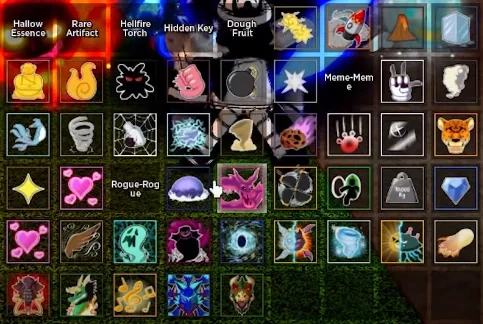
Summons a Blox Fruit rain event that drops various fruits from the sky.
Spawns different types of Blox Fruits in the surrounding area.
Allows players to collect the spawned fruits.
Only affects fruit spawning and does not change other gameplay systems.
Gives the selected player the YouTuber title.
Adds the YouTuber title to the target player's name or profile.
Requires a valid player name or matching input.
Only changes the player's title display.
Creates a barrage effect that repeats the player's used abilities.
Multiplies the selected ability into a rapid barrage.
Applies to abilities used after activating the command.
Only affects ability usage and does not change the ability itself.
Allows the player to spawn high-level sea events.
/seav [event name] creates selected sea events from Danger Levels 5–6.
Supports special events such as the Frozen Dimension using /seav LeviathanGate.
Requires a valid sea event name.
Allows the player to spawn Boat Dealers at a chosen location.
Creates Boat Dealers anywhere in the game world.
Allows players to purchase boats from the spawned NPC.
Only affects Boat Dealer placement.
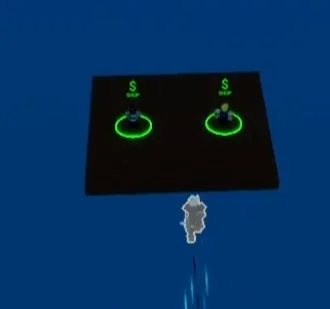
Allows the player to change the size of other players.
/size [player] [number] resizes a selected player.
/size all [number] applies the size change to all players in the server.
Only affects player size and appearance.
Allows the player to change the size of the held Blox Fruit.
Resizes the currently equipped physical Blox Fruit.
Only affects the fruit's appearance and size.
Does not change the fruit's abilities or effects.
Resets the player's progress and inventory to a Third Sea starting state.
Removes all items except Combat and Dark Blade.
Resets level, Bounty/Honor, skins, mastery, currency, Fragments, Flash Step, Instinct, Aura, and other progress.
Acts as a complete player data reset.
Disables the abilities of players within a specific area around the user.
Prevents nearby players from using their abilities.
Affects all players inside the set radius.
Only disables ability usage and does not remove abilities.
Allows the player to spawn a selected model or mesh.
/model [name] inserts the specified model or mesh into the game.
Supports models such as the Eastern Dragon using /model East.
Only affects object spawning and placement.

Spawns a temporary Blox Fruit that cannot be collected.
Creates a fruit that drops and moves around when interacted with.
The fruit cannot be obtained or stored.
Automatically disappears after a period of time.
Grants the player access to the exclusive Rogue fruit.
Gives the Rogue fruit and its abilities to the user.
The command is restricted to the owner only.
Not available to regular players.
TBA
Allows the player to manually change the in-game time between daytime and full moon nighttime.
/fm changes the current in-game time to day.
/unfm changes the current in-game time to a full moon night.
Functions the same as other time-changing commands.
Allows the player to toggle their character's visibility between invisible and visible states.
/invis makes the player completely invisible.
/uninvis restores the player's visibility.
Only changes the player's appearance and does not affect other gameplay mechanics.
Allows the player to become immune to damage by granting infinite health.
/god enables infinite health for the player.
/ungod disables the effect and restores normal health behavior.
Prevents the player from taking damage while active.
Allows the player to set their movement speed to a chosen value.
/speed [number] changes the player's movement speed based on the entered value.
Can increase or decrease movement speed.
Only affects the player's movement speed.
Allows the player to obtain the abilities of a specified Blox Fruit or fruit skin.
/g [fruit name] grants the player the abilities of the entered fruit without giving a physical fruit item.
Supports shortened names if the input is unique (for example, /g da for Dark).
Can also grant Blox Fruit skins.
Does not create a tradable or physical fruit.
Allows the player to give another player the abilities of a specified Blox Fruit or fruit skin.
Grants the target player the entered fruit's abilities without creating a physical fruit item.
Uses the same name matching and shortened input system as /g.
Allows the player to obtain a physical version of a specified Blox Fruit.
Gives the actual Blox Fruit item instead of only granting its abilities.
The obtained fruit can be stored, traded, or used normally.
Requires the player to enter a valid fruit name.
Allows the player to switch to a selected fighting style.
Changes the player's current fighting style to the entered one.
Supports shortened names if the input is unique.
Requires a valid fighting style name.
Allows the player to teleport to another player currently in the same server.
Teleports the player directly to the selected server player.
Only works with players who are currently in the same server.
Requires a valid player name or matching input.
Allows the player to teleport another player to their location.
Brings the selected player directly to the command user's position.
If the target player is sitting on a boat, the boat and any players seated on it are moved as well.
Requires a valid player name or matching input.
Allows the player to join another player's active game server without needing to be friends.
Teleports the player into the selected player's current public server.
Works only when the target player is currently in-game.
Cannot be used to join private servers.
Allows the player to join another player's server, including private servers.
Teleports the player to the selected player's current server.
Works for both public and private servers.
Does not require the players to be friends.
Instantly restores the player's health and energy to full.
Fully refills health.
Fully restores energy.
Takes effect immediately when used.
Permanently removes a selected player from the game through their player ID.
/ban [Player ID] permanently bans the specified player.
Prevents the banned player from accessing the game.
Requires a valid player ID.
Removes a selected player from the current server without permanently banning them.
Kicks the specified player from the server.
The player can rejoin the game afterward.
Requires a valid player name or matching input.
Temporarily prevents a selected player from moving in the current server.
/freeze locks the target player's movement.
/unfreeze restores the player's ability to move.
The effect is removed if the player leaves and rejoins the server.
Allows the player to obtain any sword, gun, or accessory.
Grants access to selected swords, guns, and accessories.
Requires the player to enter a valid item name.
Does not apply to other item categories.
Allows the player to obtain holdable items from the game.
Grants selected holdable items when entered.
Does not support weapons or physical Blox Fruits.
Requires a valid item name.
Allows the player to modify their Bounty or Honor value.
/b [amount] sets the player's Bounty to the specified amount.
/r [amount] sets the player's Honor to the specified amount.
Directly changes the player's current Bounty or Honor value.
Allows the player to set their level and stats to specified values.
Changes a selected stat or level to the entered amount.
Can modify any available stat value.
Requires a valid stat or level value.
Sets the player's level to the game's maximum level.
Sets the player's level to the maximum allowed value.
Only affects the player's level and cannot modify other values.
Requires the entered value to be within the valid level range.
Allows the player to use abilities without cooldown restrictions.
Removes cooldown timers from abilities and actions.
/unfun disables the effect and restores normal cooldowns.
Only affects cooldown behavior while active.
Allows the player to use abilities without cooldowns or usage restrictions.
Removes all ability cooldowns.
Allows abilities to be used while other abilities are still active.
/unopfun disables the effect and restores normal behavior.
Bypasses the Summon Sea Beast limit while active.
Allows the player to modify their Race Awakening gears and duration.
Changes the player's Race Awakening gear settings.
Adjusts the duration of Race Awakening effects.
Only affects Race Awakening-related values.
Allows the player to activate their Race Awakening and fully charge its meter.
Instantly fills the Race Awakening bar.
Activates the player's current Race Awakening.
Only affects Race Awakening status.
Allows the player to access Race Awakening trials without completing the required quest.
Enables the player to pull the trial lever directly.
Bypasses the Race Awakening quest requirement.
Grants access to trials without changing other Race Awakening progress.
Teleports the player directly to the Mysterious Force NPC to quickly access the Temple of Time.
Moves the player to the top of the Great Tree.
Provides faster access to the Temple of Time entrance.
Only affects player location.
Allows the player to spawn a selected enemy, boss, or Raid Boss.
/spawn [name] creates the specified enemy or boss.
Supports normal enemies, bosses, and Raid Bosses.
Requires a valid NPC or boss name.
Allows the player to awaken a selected Blox Fruit.
/aw [fruit name] awakens the entered fruit.
Requires a valid awakenable Blox Fruit.
Only affects the player's current fruit awakening state.
Allows the player to revert a previously awakened Blox Fruit.
Removes the awakening effects from the selected fruit.
Functions as the opposite of /aw.
Only affects awakened Blox Fruit abilities.
Allows the player to switch their current race.
/race [race name] changes the player's race to the selected one.
Requires a valid race name.
Only changes the player's current race.
Fills the player's rage based meter to its maximum value.
Instantly maxes out available rage meters.
Applies to systems such as Tempo Meter, Fury Meter, or Tails.
Allows the player to use meter-based abilities immediately.
Adds a specified quantity of all game items to the player's inventory.
Grants the entered amount of each available item.
Adds items directly to the player's inventory.
Requires a valid quantity value.
Allows the player to instantly kill or reset a selected player regardless of PvP status.
Defeats the targeted player even if their PvP is disabled.
Does not reward any Bounty or Honor.
Requires a valid player name or matching input.
Allows the player to instantly kill or reset all players in the server.
Defeats all players, including the command user.
Can also be activated with /kill all.
Does not provide Bounty or Honor rewards.
Creates a rain zone around the player within a set radius.
Generates a weather area similar to the Tiki Outpost rain effect.
Affects only the area within the specified radius.
Changes the local environment without affecting gameplay mechanics.
Allows the player to impersonate a selected character or avatar.
Changes the player's appearance to the chosen character.
Supports characters such as Roblox, builderman, rip_indra, Zioles, and others.
Only affects the player's visual identity.
Changes the player's equipped Dragon (Classic) fruit into a special Pink Dragon variant.
Replaces the normal Dragon appearance with the Pink Dragon form.
Keeps the Dragon (Classic) fruit abilities while changing its transformed form.
Known as the James Charles Dragon or Pink Dragon.
Grants the player access to use all Blox Fruits, including exclusive and unavailable fruits.
Allows access to fruit abilities and passive effects.
Adds removed or admin-exclusive fruits to the player's hotbar.
Enables use of all fruit types regardless of normal availability.
Summons a Blox Fruit rain event that drops various fruits from the sky.
Spawns different types of Blox Fruits in the surrounding area.
Allows players to collect the spawned fruits.
Only affects fruit spawning and does not change other gameplay systems.
Gives the selected player the YouTuber title.
Adds the YouTuber title to the target player's name or profile.
Requires a valid player name or matching input.
Only changes the player's title display.
Creates a barrage effect that repeats the player's used abilities.
Multiplies the selected ability into a rapid barrage.
Applies to abilities used after activating the command.
Only affects ability usage and does not change the ability itself.
Allows the player to spawn high-level sea events.
/seav [event name] creates selected sea events from Danger Levels 5–6.
Supports special events such as the Frozen Dimension using /seav LeviathanGate.
Requires a valid sea event name.
Allows the player to spawn Boat Dealers at a chosen location.
Creates Boat Dealers anywhere in the game world.
Allows players to purchase boats from the spawned NPC.
Only affects Boat Dealer placement.
Allows the player to change the size of other players.
/size [player] [number] resizes a selected player.
/size all [number] applies the size change to all players in the server.
Only affects player size and appearance.
Allows the player to change the size of the held Blox Fruit.
Resizes the currently equipped physical Blox Fruit.
Only affects the fruit's appearance and size.
Does not change the fruit's abilities or effects.
Resets the player's progress and inventory to a Third Sea starting state.
Removes all items except Combat and Dark Blade.
Resets level, Bounty/Honor, skins, mastery, currency, Fragments, Flash Step, Instinct, Aura, and other progress.
Acts as a complete player data reset.
Disables the abilities of players within a specific area around the user.
Prevents nearby players from using their abilities.
Affects all players inside the set radius.
Only disables ability usage and does not remove abilities.
Allows the player to spawn a selected model or mesh.
/model [name] inserts the specified model or mesh into the game.
Supports models such as the Eastern Dragon using /model East.
Only affects object spawning and placement.
Spawns a temporary Blox Fruit that cannot be collected.
Creates a fruit that drops and moves around when interacted with.
The fruit cannot be obtained or stored.
Automatically disappears after a period of time.
Grants the player access to the exclusive Rogue fruit.
Gives the Rogue fruit and its abilities to the user.
The command is restricted to the owner only.
Not available to regular players.
TBA
Roblox Commands
Roblox Commands are general commands that can be used across most Roblox games. If Not All Games.
Opens the Roblox Developer Console for viewing game information and diagnostics.
Allows players to access console tools available in most Roblox experiences.
Can be used to check information such as server session time.
Works across most Roblox games.
Clears all visible chat messages from the current chat window.
Removes existing chat history from the player's view.
Does not affect gameplay or other players' chat.
Works in most Roblox games as a universal command.
Allows the player to perform a selected Roblox emote or animation.
/e [emote name] plays a pre-programmed animation.
Supports keywords such as dance and point, as well as equipped emotes.
Works in most Roblox games as a universal command.
Allows the player to send private chat messages to a selected player.
Makes chat messages visible only to the chosen player.
Commonly known as private messaging or PM-ing.
Works in most Roblox games as a universal command.
Opens the Roblox Developer Console for viewing game information and diagnostics.
Allows players to access console tools available in most Roblox experiences.
Can be used to check information such as server session time.
Works across most Roblox games.
Clears all visible chat messages from the current chat window.
Removes existing chat history from the player's view.
Does not affect gameplay or other players' chat.
Works in most Roblox games as a universal command.
Allows the player to perform a selected Roblox emote or animation.
/e [emote name] plays a pre-programmed animation.
Supports keywords such as dance and point, as well as equipped emotes.
Works in most Roblox games as a universal command.
Allows the player to send private chat messages to a selected player.
Makes chat messages visible only to the chosen player.
Commonly known as private messaging or PM-ing.
Works in most Roblox games as a universal command.